Setting up servings
Servings let you control how table orders are organised and sent to the kitchen. Before your staff starts taking orders, choose how you want to work with servings in BackOffice.
There are three types of servings you can use — on their own or in combination:
- Standard courses — link your articles to named courses like Appetizer, Main course, and Dessert. Articles are automatically sorted into the right serving when added to an order in the register.
- Open serving — a dedicated serving for drinks and other items that get re-ordered throughout the meal. Always fired first, and can be re-fired as many times as needed without sending a correction to the kitchen. Most restaurants only need one, but you can set up more if needed.
- Flexible servings — build servings freely in the register as you go. No setup required. This is how OPEN Two works by default.
Avoid mixing standard courses and flexible servings
If some articles are linked to standard courses and others are not, both named courses (e.g. "Appetizer") and generic servings (e.g. "Serving 1") will appear in the register at the same time. This creates confusion for staff. Make sure all food articles are either linked to standard courses or none of them are.
Which setup is right for you?
| Standard courses + Open serving | Open serving only | Flexible servings only | |
|---|---|---|---|
| Best for | Fixed menus served in a set order | Any restaurant that wants drinks handled separately | Restaurants where guests order freely |
| Drinks | Separate open serving | Separate open serving | Mixed into flexible servings |
| Food | Auto-sorted into named courses | Flexible servings | Flexible servings |
| Setup required | Yes — link articles to courses | Minimal — link drink articles only | None |
Set up servings in BackOffice
- In BackOffice, go to Table management and select Servings.
- The setup questionnaire opens. You can skip it at any time and return to it later — your approach can be changed whenever you like.

Step 1: Drinks handling
Do you want drinks to be handled separately from food?
- Yes — drinks go in their own open serving that is always prioritised when fired. You can add more drinks to a fired open serving without sending a correction. Select this if you want staff to be able to re-order drinks freely throughout the meal.
- No — drinks are handled like any other article and added to flexible servings alongside food. Select this if your guests typically order everything at once.

Step 2: Food serving order
Do you serve food in a fixed course order?
- Yes — you always serve in a set order, for example starters → mains → dessert. Select this to use standard courses and have articles automatically sorted in the register.
- No — guests order freely, and an appetizer might arrive as a main course. Select this to keep using flexible servings for food while still separating drinks into an open serving.

Step 3: Number of courses
(Shown if you selected a fixed course order in step 2)
Enter how many courses or serving rounds you have. The default is 3 — the classic case of Appetizer, Main course, and Dessert. You can add as many as you need for a tasting menu.

Step 4: Name your serving rounds
Name each serving round and drag to set the order they will be fired in. The names you enter here are what staff will see in the register.
If you chose to include an open serving for drinks, it will always be fired before any standard courses — this cannot be changed.
Tap Link articles when you are done.

Flexible ordering — no setup required!
(Shown if you selected No in step 1 and No in step 2)
If you want drinks handled the same as food and your guests order freely, no setup is needed. All articles are flexible — staff can mix dishes and drinks in the same serving in any order they like.
You can always add standard courses or an open serving later by clicking Link articles.

Link articles to servings
After completing the questionnaire, you are taken to the Servings page where you link your articles to their respective servings.
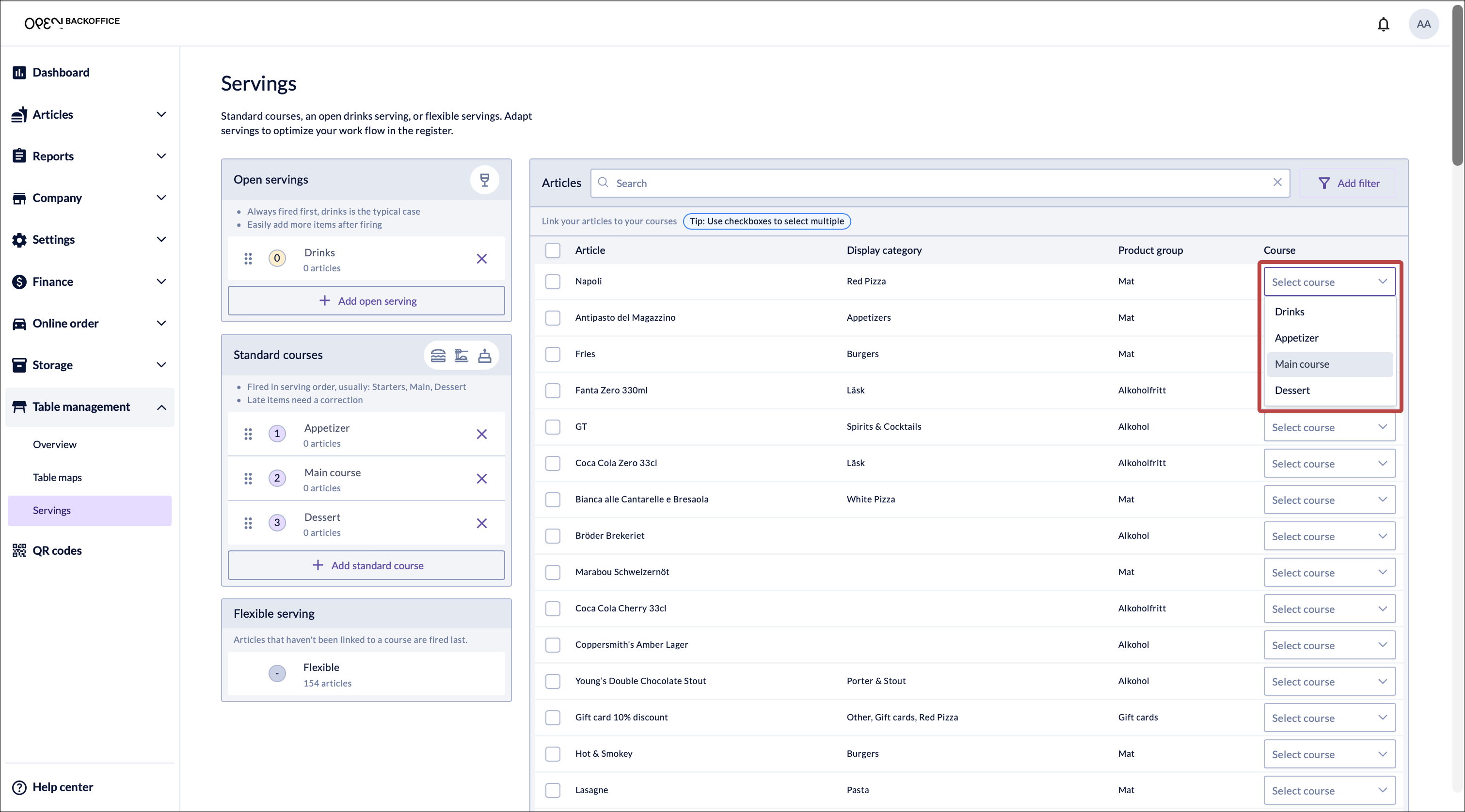
The page shows three sections:
- Open servings — link your drink and bar articles here. Open servings are always fired before standard courses. If you have more than one open serving, you can set their internal firing order.
- Standard courses — link your food articles to the named courses you set up. Articles fire in the order shown.
- Flexible — any article not linked to a course ends up here and is added to a flexible serving in the register. If you are using standard courses, this section should ideally be empty.

To link an article:
- Find the article in the list on the right. Use Search or Filter to narrow it down.
- In the Course column, select which serving the article belongs to.
- To link multiple articles at once, tick the checkboxes and select a course from the bulk action menu.
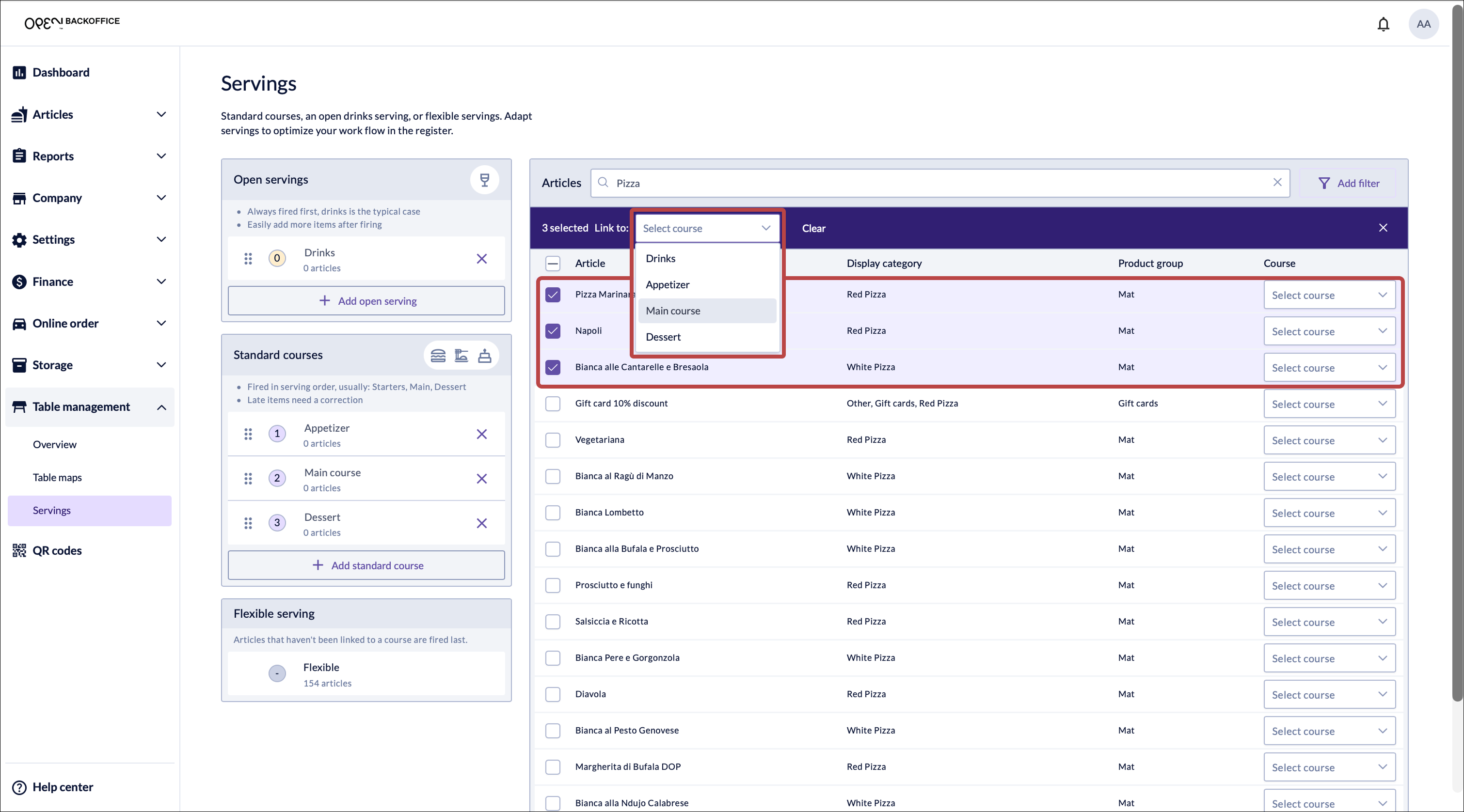


Your changes are saved automatically.
Filter your list
Change your setup later
You can return to the Servings page at any time to change your approach. Go to Table management → Servings in BackOffice.
Keep in mind that if you switch from flexible servings to standard courses, you will need to link your articles to courses before the new setup takes effect in the register.